Enquiries inSpam out
Build a contact, quote or booking form in minutes. Real enquiries land in your inbox and your email. Spam is stopped by five layers that work in the background, so you aren't reading about casinos on a Monday morning.
Free for 14 days. Card needed, nothing charged until the trial ends. Forms are on every plan.
Start from a template
Drag, dropTry it, publish
Start from a template (Contact, Quote request, Newsletter signup, Event RSVP or Job application) or a blank page. Click a field to change it. Press “Try it” to fill the form in exactly as a visitor would, before anyone sees it.
- Show a question only when it matters. Reveal “Which service?” only after someone ticks “Other”. Hidden fields aren't required.
- Check it on a phone. Switch between desktop, tablet and phone widths.
- Pause when you need to. Every new form starts paused, so nothing arrives until you set it live.
- Place it anywhere. Add it in the page builder, drop a short code into a page, or share its own link.
Every enquiry in one place
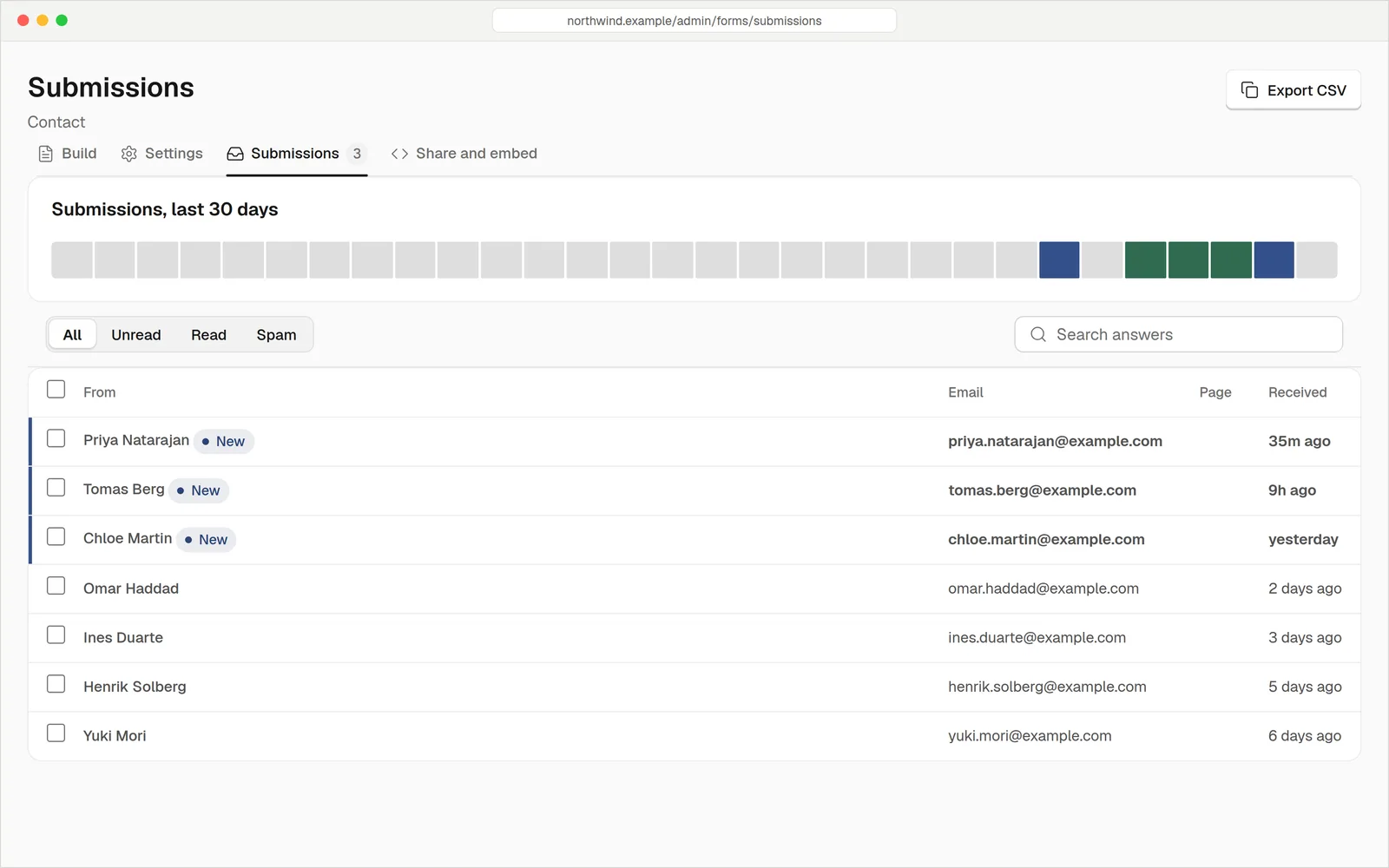
Each message arrives by email and sits in a submissions inbox in your dashboard. New ones are marked, so you can see what you haven't read. Search the answers, filter the list, and export it as a spreadsheet when you need it.
- Unread at a glance. A badge on Forms counts new enquiries. Opening one marks it read.
- Reply from the list. Start an email to the person who wrote.
- Export to CSV. Exactly what your search and filter show, ready for a spreadsheet.
- You choose how long it's kept. 30 days, 90 days, a year or never, or don't store the visitor's IP address.
Five checks before it reaches you
Every submission goes through the same line of checks on the server, whether it comes from your form or a bot posting straight at it. No set-up needed for the first four.
- 1
Honeypot
A hidden field only a bot would fill in. If it's filled, the bot is told “thanks” and nothing is stored.
On by default - 2
Captcha
Optional, per form. Cloudflare Turnstile, Google reCAPTCHA v3 (invisible) or hCaptcha.
You choose - 3
Minimum time
A form filled in faster than a person could (3 seconds by default) is suspicious.
You set the time - 4
Content rules
Too many links (2 by default), words you block, or a script like Cyrillic you don't expect.
Add your own words - 5
Rate limit
Allow a set number of sends an hour from one visitor, per form.
Per form
Lands in your inbox, and you get the email.
Saved as Spam, with no email sent. Check the Spam tab and rescue any real message. Or choose to refuse it outright.
Spam protection
Pick the captcha you trust
Turn the spam check on for the forms that need it. You paste in the keys from your provider and press “Test connection” to check them before you save.
- Cloudflare Turnstile. A visible widget above the send button.
- Google reCAPTCHA v3. Invisible. Visitors see nothing, and low scores are stopped.
- hCaptcha. A visible widget, a popular privacy-minded alternative.
Only the provider you pick is added to your page's security policy. If you switch the captcha on but forget the keys, your form keeps taking enquiries and warns you instead of going quiet.
Hear about it the moment it happens
Send the email to you, your whole team, or both. Connect other tools with a webhook so a new enquiry can reach your CRM, your chat or a spreadsheet.
- Email notifications. Choose who gets each enquiry. Leave it empty to use your site's address.
- Webhooks. Each form.submitted call is signed so your system can check it came from your site. The message carries IDs, not the answers, because answers are personal.
- Conversions counted. Google Analytics and Meta see each enquiry as a lead. Tag manager sets it up.
- Name
- Sam Rivera
- Need
- A blocked kitchen drain
- Photos
- drain.jpg (2.4 MB)
The details you'd hope for
Many field types
Text, email, phone, long text, choices, date, number and web address, plus headings, notes and dividers.
File uploads with limits
Choose allowed types and a size (10 MB by default, 25 MB at most). The real content is checked, so a renamed file is refused.
Private files
Only signed-in owners and editors can download an upload, and it's deleted with its submission.
Show-when rules
Show a field only when another answer matches.
Conversion numbers
See views, sends and conversion for each page a form appears on, over the last 30 days.
Reply and forward
Answer from the list, or forward a submission to a colleague by email.
Keyboard shortcuts
Move through submissions with j and k, and close with Esc. Undo and redo while you build.
Your own spam words
Add a word list for one form on top of the site-wide rules.
A link for every form
Each live form has its own page you can share. Search engines are asked not to index it.
No form plugin to buy
| hatamoto.io | WordPress with a form plugin | |
|---|---|---|
| Form builder | Built in | ~ Plugin, often with a paid tier |
| Submissions inbox and CSV | Built in | ~ Often a paid add-on |
| Captcha choices | Turnstile, reCAPTCHA v3, hCaptcha | ~ Depends on the plugin |
| Honeypot, time and link rules | Layered, always on | ~ Varies |
| File uploads checked by content | Yes | ~ Varies |
| Plugin updates to look after | None | Yes |
QuestionsAnything else, just ask
Talk to usNobody can promise that. Five layers stop the great majority, and anything that slips through can be moved to Spam.
It's saved in the Spam tab, with no email sent to you. The sender sees the normal thank-you, so a bot learns nothing. You can restore real ones.
Not to get started. The honeypot, timing and content rules work without one. Add Turnstile, reCAPTCHA v3 or hCaptcha to forms that attract more spam.
Yes. Set a retention period, hide IP addresses, or switch off storing so submissions are emailed only and nothing about the visitor is kept.
No, a captcha needs a script. Forms without the captcha switch still work without one.
Yes. Each form has its own fields, settings and status, and you can duplicate one as a starting point.
Your first form could be live today
Try everything free for 14 days. Card needed, nothing charged until the trial ends.