Leave WordPressKeep everything
Upload your WordPress export and we bring across your pages, posts, images and menus. Every old link forwards to its new home, so the visitors and search traffic you have keep arriving.
Business plan: we do the move for you.
Importing harbourstreetbakery.com.au
- 38pages
- 214blog posts
- 1,120images
- 252old links redirected
Done. Every old address checked.
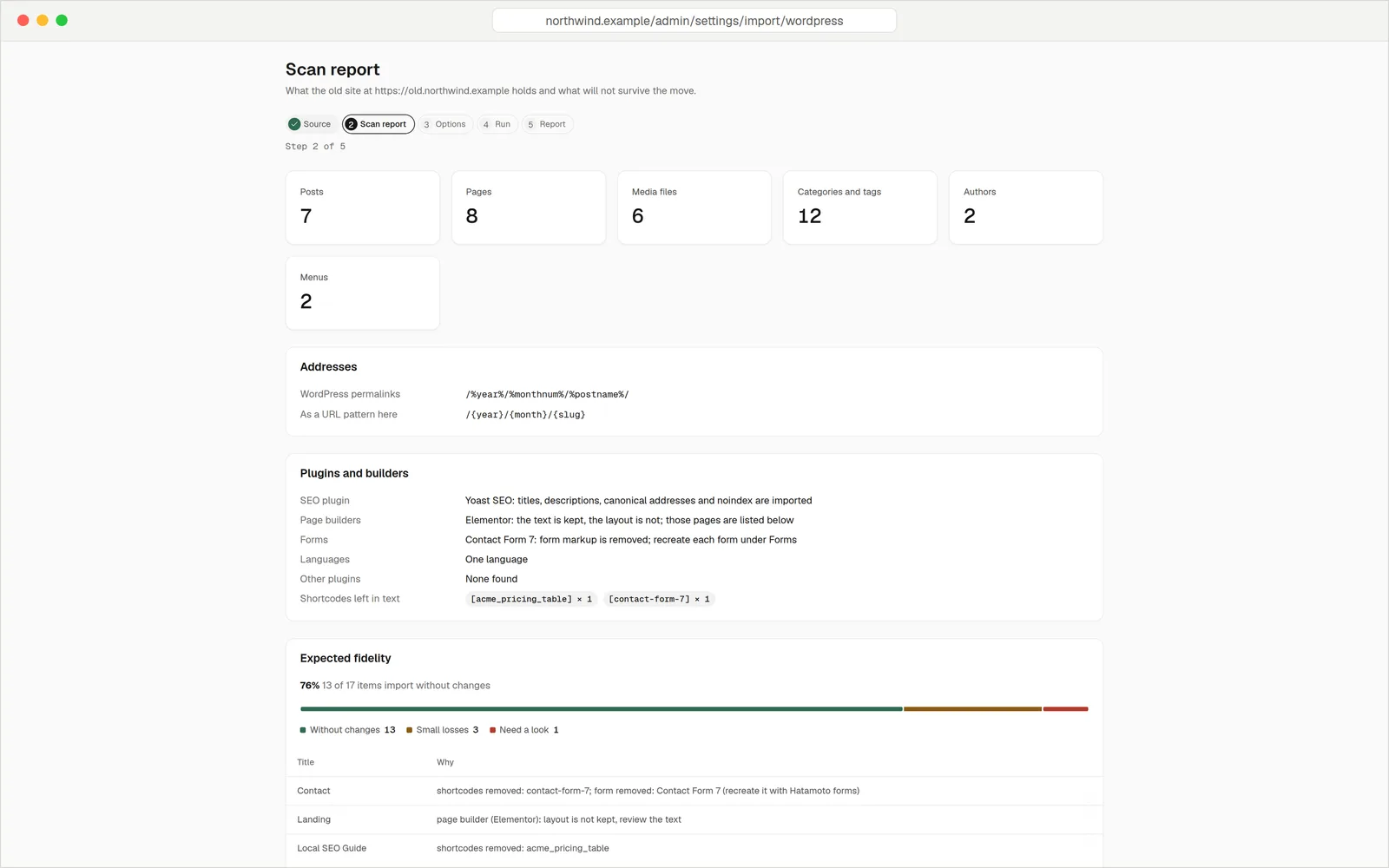
The scan report, shown before the import starts.
See the plan before anything changes
The first step is a scan. It counts what's on your WordPress site and tells you what will come across cleanly and what needs a look. Nothing is changed until you say so.
- Counts of everything. Pages, posts, drafts, images, categories, tags, authors and menus.
- Your plugins, named. It spots SEO plugins, page builders and form plugins, and lists the others.
- An honest fidelity score. It shows how many items come across without loss, and why the others don't.
Every old link still works
Links to your old pages are all over Google, other sites and old emails. When an address changes, the import adds a permanent redirect (a 301) from the old one to the new one. Then it checks them all.
- The URL audit. Every address in your old sitemap is requested on the new site. Each one has to answer, or forward once to a page that does.
- Same addresses when possible. Your WordPress permalink style becomes your address pattern, so on a new site most addresses don't change at all.
- A catch-all for stragglers. The 404 log lists addresses visitors asked for that don't exist, so you can add a redirect.
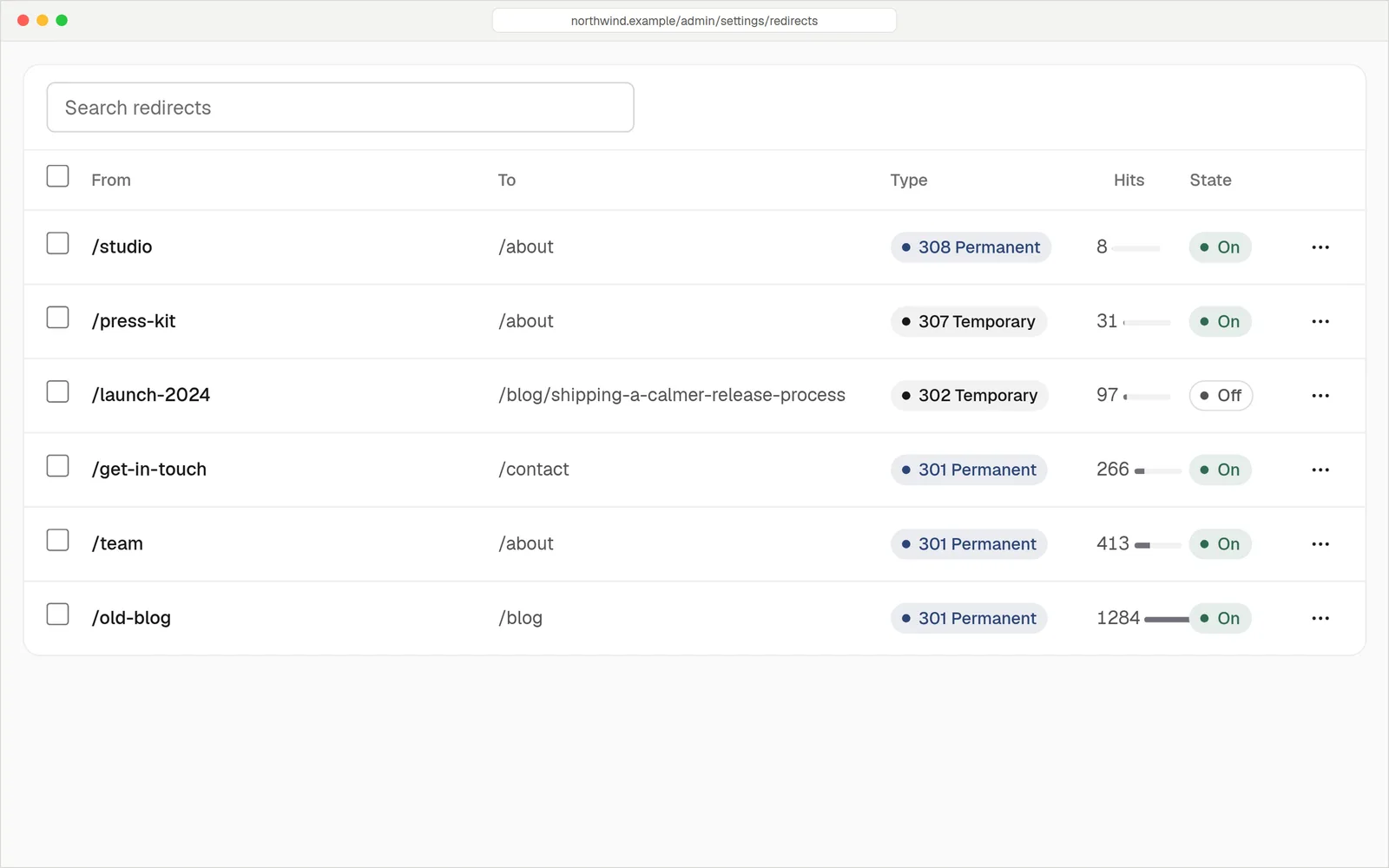
Redirect rules, with how often each one is used.
What comes acrossAnd what doesn't
A move is easier when you know the gaps up front. This is what the importer does, taken from how it actually works.
Comes across
- Pages, with their parent and child structure
- Blog posts, categories and tags
- The whole media library, with every image size pointing to the one original
- Menus, with their nesting
- Site title, tagline, language and time zoneOn an empty site. A site with content keeps its settings.
- SEO titles, descriptions, canonical addresses, noindex and social imagesFrom Yoast, Rank Math, SEOPress and All in One SEO.
- Authors, as people, not public until you switch them on
- Drafts, plus private and password-protected posts as drafts
- YouTube and Vimeo embeds
- Internal links, which follow the page if you rename it later
- Your custom CSS
Doesn't come across
- CommentsHatamoto has no comments. Export them from WordPress first if you want to keep them.
- ShopsWooCommerce products come over as plain pages. No prices, cart or stock. Keep your shop where it is.
- Page-builder layoutsElementor, Divi, WPBakery, Avada, Beaver Builder and Bricks pages keep their text. You rebuild the layout in the editor.
- FormsContact Form 7, Gravity Forms, WPForms and the rest are removed and listed. Recreate them with Hatamoto forms.
- Plugins and their data, widgets and sidebars
- User accounts and passwordsInvite your editors again.
- Your WordPress themePick a template and restyle it.
- Revisions
- Other languages of a multilingual siteThey're imported and tagged, but only the site language is public.
Plugins you can retire
Much of what a WordPress site uses plugins for is part of hatamoto.io. These are the jobs that no longer need a plugin.
Three stepsOne afternoon
Upload your export
In WordPress, go to Tools, Export and choose All content. Upload the file to your new site. The importer reads it without touching your old site.
Read the scan, then import
Check the report. Rerun the import as often as you like before you switch, to pick up new posts. Then compare your key pages side by side.
Point your domain
Change your domain's DNS when you're happy. The URL audit has already checked your old links, and the 404 log catches the rest.
Rerun the import before you switch, not after: a rerun overwrites edits you've made in Hatamoto, unless you ask it to keep them.
Old address to new address
/2024/05/sourdough-tips/→/blog/sourdough-tips301, checked/about-us/→/about301, checked/our-services/→/classes301, checked/contact/→/contactSame page, same addressRather not do it yourself?
On the Business plan, we do the move for you. We run the import, check the report, fix what we can and tell you plainly what needs your attention.
- Included in Business, USD 20 a month, billed yearly.
- Try before you pay. The 14 day trial is free. Card needed, nothing charged until the trial ends.
QuestionsAnything else, just ask
Talk to usWe can't promise anything about rankings. What we do is keep your addresses working with permanent redirects and check them all, which is what search engines need to carry your pages over.
No. The import reads from your old site or an export file. It stays online until you change your domain's DNS.
The text comes across, and the page is marked for review. You rebuild the layout in the Hatamoto editor, using the imported text.
Hatamoto doesn't do e-commerce. If your WordPress site sells things, keep the shop where it is and move the rest.
Yes, as often as you need before you switch. It updates what it imported and never duplicates it.
Your WordPress export file is your archive. Keep it. Revisions and plugin data aren't imported.