Let your AI assistant do the busywork
Ask Claude, ChatGPT or Cursor to draft a post, tidy a menu or tell you which pages AI crawlers skip. It works on your real site, with a key you create, limits you choose and a log of everything it did.
Works with any assistant that supports MCP, the standard way AI tools connect to other software.
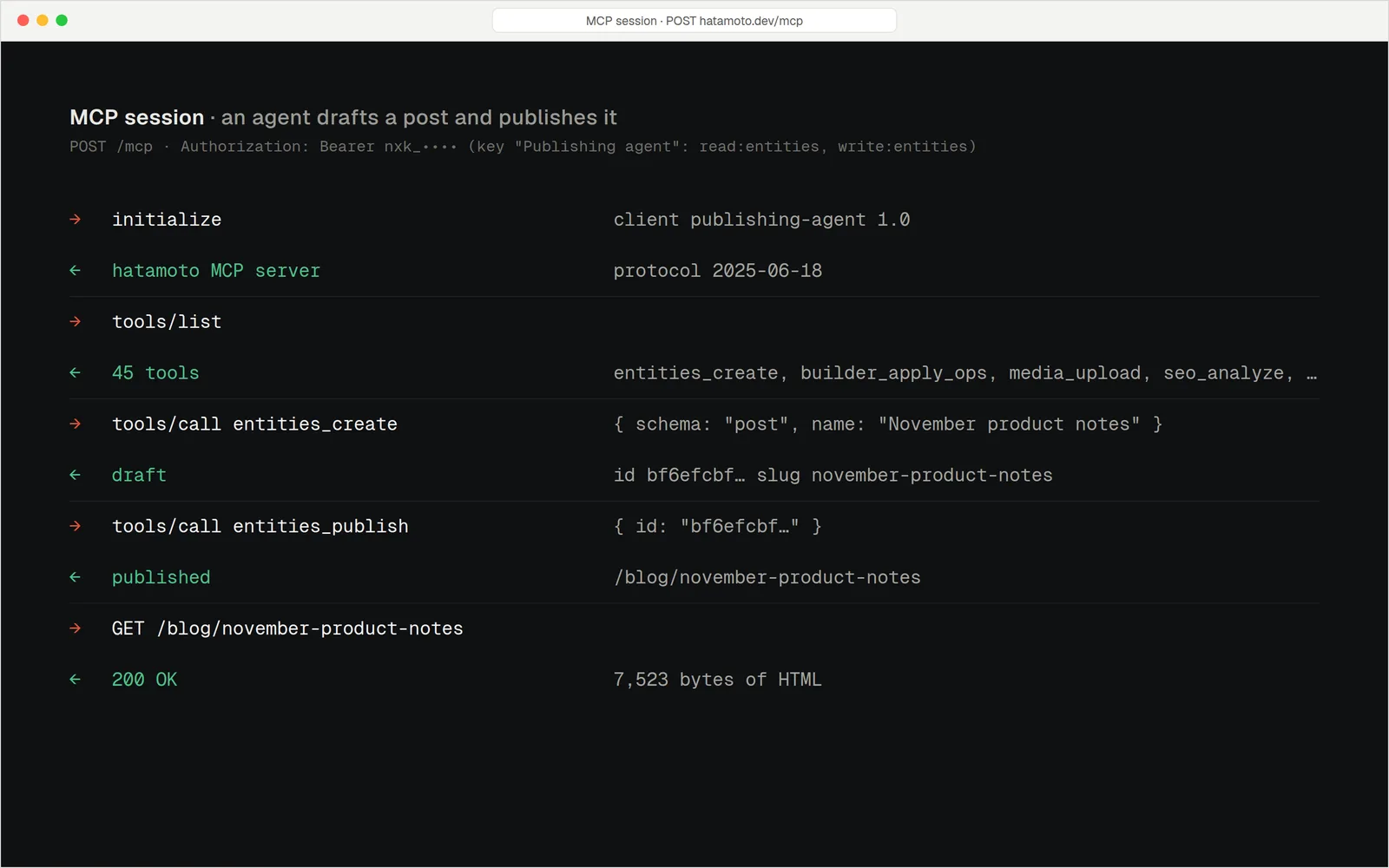
It can do what you'd do. No more
Your assistant connects with its own key. The key acts as you, so it can never do more than your own account can, and it stops working if your account loses its role.
- Draft and edit. Create posts and pages, update them, and keep tags, menus and redirects in order.
- Read your numbers. Ask which AI crawlers visited, which pages they skipped and how many visitors AI sent.
- Check before you ship. It can preview your sitemap and llms.txt and test a page's structured data.
A key with limits
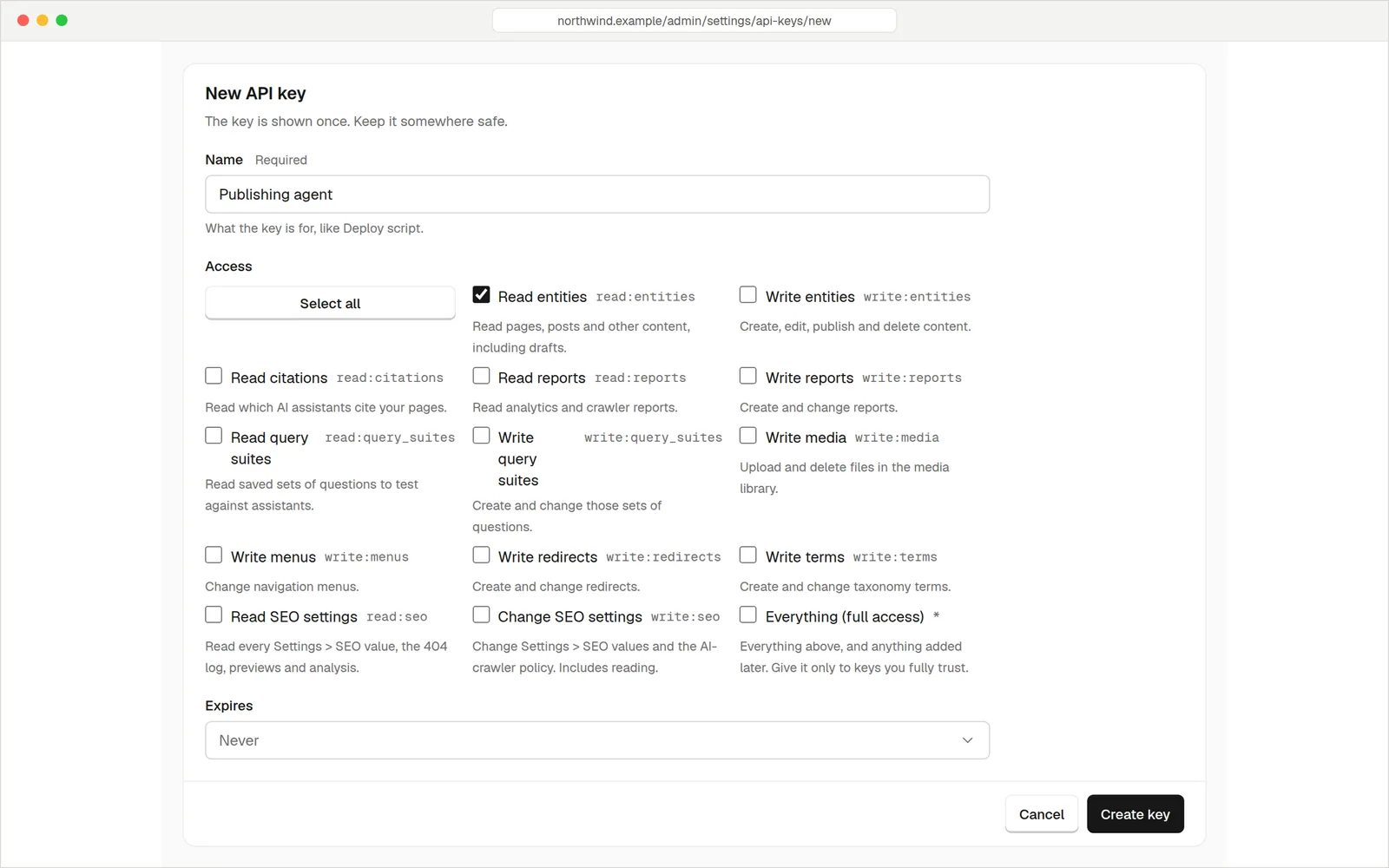
You make a key in the admin and tick exactly what it may do. A key that only reads can never change a page. A key that writes only touches the things you ticked. Set an expiry and it ends on its own.
- Pick the access. Read content, write content, upload media, edit menus, edit redirects, change SEO settings, read reports.
- Expires on its own. Never, in 30 days, in 90 days or in a year.
- Shown once. Replace the secret or revoke the key at any time. Revoking works at once.
- One key per assistant. A research helper gets read-only. A writing helper gets its own, separate key.
Nothing sneaks past your site
An assistant doesn't get a back door. It goes through the same checks as your own editor.
Same checks as the editor
What happens when an agent saves a page
Audit log
Every call, allowed or refused
entities_createRye for beginnersokseo_analyze/blog/ryeokmenus_updateheaderrefusedanalytics_crawler_hitsok
Refused: that key has no menu access.
Technical detail: tools call the same internal services as the admin, not a side route. Audit rows are kept for 90 days. The default limit is 1,000 requests per hour per key.
The address is your site followed by /mcp. Keys start with nxk_. The server speaks standard MCP over HTTPS, so any compatible tool can connect.
Three minutesStart to finish
Make a key
In Settings, Integrations, API keys. Name it, tick what it may do, set an expiry. Copy it: it's shown once.
Add your site to your assistant
Paste your site's address and the key into the assistant's MCP settings.
Ask for something
"List my five newest posts and tell me which AI crawlers read my site this month."
Decide how much to trust it
New content an agent creates starts as a draft. But the access that lets an agent write also lets it publish. Hatamoto has no "draft only" access today, so we'd rather say so plainly.
- Cautious: give the assistant read-only access, and let it advise while you make the changes.
- Hands-on: give it write access, tell it to stop at drafts, and check the audit log and version history.
- Either way: short expiries and one key per assistant keep the damage small if something goes wrong.
Keys on Harbour Street Bakery
Tools your assistant can use
Pages and posts
List, read, search, create drafts, update, publish and unpublish. It reads the content type first so it knows which fields exist.
Media
Upload JPG, PNG, GIF, WebP, PDF, MP4 and WebM with alt text and a caption. SVG is never accepted.
Menus and tags
Rework header, footer and sidebar menus. A bad menu is rejected whole, so your live menu stays untouched.
Redirects
Create and remove 301, 302, 307 and 308 redirects, including wildcard patterns.
SEO checks
Preview your sitemap and llms.txt as crawlers get them, analyse a page, list 404s, and validate structured data.
Reports
AI crawler visits, first crawls, Google crawling, AI-referred visits, traffic by channel and form leads. Counts only, no personal details.
Assistants that ask first: updates, unpublishing, menu changes and deleting redirects are flagged so a well-behaved client asks you to confirm.
QuestionsAnything else, just ask
Talk to usAny tool that supports MCP servers over HTTP, which includes many desktop assistants and coding tools. Check your tool's settings for "MCP servers".
If its key has write access, yes: that access includes publish. For a hard stop, give it read-only access, or watch the audit log.
Changes are credited to the person who made the key, and the version history is tagged with the key's name, so you can see what the agent did and roll it back.
Revoke it in the admin and it stops working at once. Short expiries make this less likely to matter.
There's no add-on to buy. The MCP server is part of Hatamoto, the software your site runs.
Only what your assistant reads when you ask it to. Your site doesn't push anything out by itself.
Put your assistant to work
Start your free 14-day trial. Card needed, nothing charged until the trial ends.