Always up to dateNever on your mind
New versions are checked, installed and tested for you, at a quiet hour. If one ever misbehaves, your site goes back to the version that worked. There is no update button and no plugin to chase.
Updates are included on every plan. Free for 14 days. Card needed, nothing charged until the trial ends.
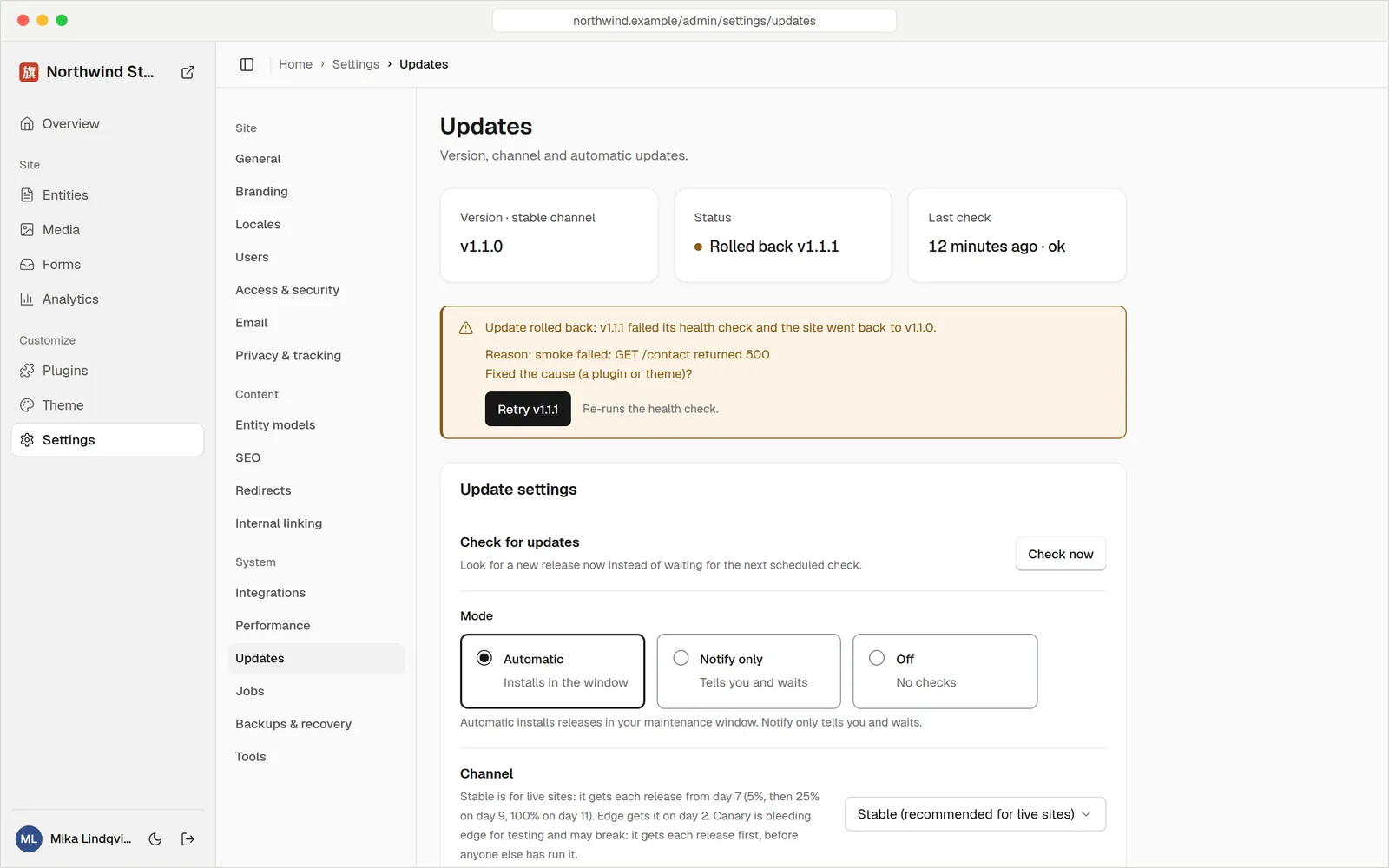
A real update that failed its health check, and was undone automatically.
Install, checkAnd undo if needed
Every update goes through the same four steps. You don't have to watch any of them.
A signed release arrives
Your site downloads the new version and checks its signature against keys it already trusts.
Unsigned or tampered files are refused.Your data is saved
Just before installing, your database is saved, so there is something to return to.
On top of your nightly backup.It installs at a quiet hour
The new version starts inside the maintenance window you choose, not in the middle of your busiest day.
Security fixes don't wait for it.A health check decides
The new version has to start up and answer. Only then does it stay.
Takes seconds.Updates
Harbour Street Bakery
Only real releases get in
Every Hatamoto release is signed by the people who build it. Your site checks the signature before it installs anything, using keys that are built into the software, so a fake update can't slip through.
- Anonymous checks. Your site asks for the list of current releases about every 6 hours. Nothing about you or your site is sent.
- Gradual rollout. New releases reach sites over a few days, so a problem is caught early.
- Big changes ask first. A new major version never installs on its own.
Updates when you're asleep
Set the hours you're happy for updates to land, in your own time zone. A bakery might pick 2 to 4 am. Pin a version or pause updates altogether if you have a big launch coming.
- Maintenance window. Pick a start and end hour. It can cross midnight.
- Pin or pause. Stay on a version line, or turn automatic installs off.
- Security fixes come first. Inside your current major version they skip the window and delay settings.
Maintenance window
Australia/Perth · installs only between these hours
What you used to keep updated
One update for everythingNot 24 plugins
A usual website stack is a core plus a theme plus a pile of plugins for SEO, forms, caching, backups and security, each with its own update and its own way to break. Here SEO, forms, caching, redirects, cookie consent and more are part of one program, so there is one version to keep current.
- No plugin clashes. Features are built to work together, so one update can't break another.
- One signed release. Not 24 sources to trust.
- Safe to go back. A rollback swaps the program only and leaves your content untouched.
Steady by defaultEarly if you want it
Most sites should follow the stable channel, which gets each release after it has been out for a week. If you like new features sooner, switch to edge. Business plans can choose either.
- Stable. Recommended for live sites, with each release arriving about a week in.
- Edge. Each release a few days after launch, for people who like to be early.
- Switch any time. No new setup and no downtime to move between them.
Update channel
Pick how early you want new versions.
The detailsCovered
Signed releases
Each release is signed and checked against keys built into your site before it installs.
A health check every time
A new version must start and answer before it is allowed to stay.
Automatic rollback
If the check fails, the previous version returns and the failed one is never fetched again.
Maintenance window
Choose the hours updates may install, in your own time zone.
Stable or edge
Follow the steady channel or get releases earlier. Business plans choose.
Saved before each install
Your database is saved right before an update installs, on top of the nightly backup.
Gradual rollout
Releases reach sites over a few days, so problems show up on a few sites first.
Security fixes first
Fixes for security problems skip the delay and window settings inside your current major version.
A private check
Looking for updates downloads one public list. No cookie, and nothing about your site is sent.
QuestionsAnything else, just ask
Talk to usWe can't promise no release ever has a bug. What we do promise is a check after every install, and an automatic return to the last good version if it fails.
No. A rollback swaps the program only. Releases are only allowed to add to the database structure, so the previous version runs fine on your data.
Yes. Set a maintenance window, pin a version line, or pause automatic installs. Security fixes still arrive promptly.
Both are signed and checked the same way. Edge gets each release a few days after launch, stable about a week.
The features most sites add plugins for are built in and update together. If you add a plugin, it runs sandboxed with only the permissions you approve.
Yes. The Updates screen in your admin lists the version you run, your channel and a history of every update and rollback.
Stay current without lifting a finger
Updates, backups and security are included on every plan. Try it free for 14 days.