Locked up before you start
No security plugin to buy, no settings to get right. Your login is hidden, your site runs on its own, and every update is signed. We watch the rest.
Security is built into every plan. Free for 14 days. Card needed, nothing charged until the trial ends.
What an attacker tries
What you open
An example. Yours is different and private to your site.
A login address bots can't guess
On most sites the login page is in the same place for everyone, and automated attackers hammer it all day. Your admin lives at an address only you know, so there's nothing for them to find.
- No /wp-admin. Go to the usual places and a bot gets a plain "not found".
- Shown to you once. The first setup link appears one time. Reach your admin from your own bookmark after that.
- Sign-in errors tell nothing. A wrong password, an unknown email and a locked account all read the same.
A password alone isn't enough
Turn on two-step sign-in with an authenticator app, or use a passkey on your phone or laptop. Your team each get their own login, and each can have their own second step.
- Authenticator app, recovery codes or passkeys. Set up under your profile in a minute.
- Guessing gets nowhere. Five wrong passwords or codes in a row lock the account for 15 minutes.
- Sessions expire. Unused sessions end after 7 days, and you can sign out on all devices.
- People leave cleanly. Remove a person and their sessions and API keys stop working at once.
Two-step sign-in
Enter the 6-digit code from your authenticator app.
Or use a recovery code or passkey
Every site runs on its own
Your site is not squeezed in next to a thousand others. It gets its own database, its own system user and its own limits on memory, processing and connections. A problem next door stays next door.
- Its own database. With its own login, so no other site can read yours.
- Its own system user. Your site can only touch its own files.
- Fair limits. A busy neighbour can't use up your memory or slow your pages.
Add-ons on a short leash
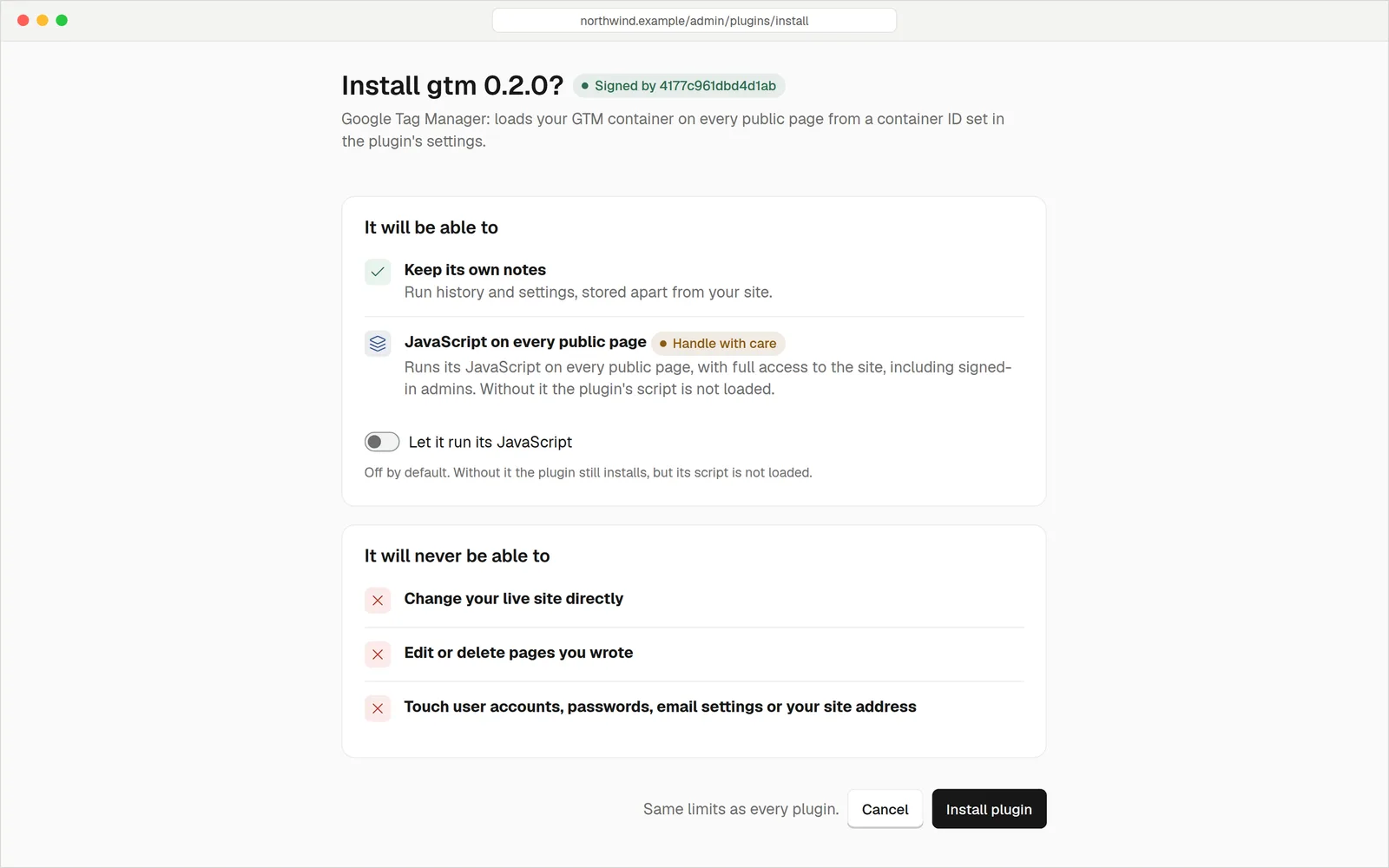
The usual way a site gets hacked is a plugin with a hole in it, and a plugin can normally do anything the site can. Here a plugin runs in a sandbox. It can do only the things you tick when you install it.
- Permissions you can read. Each plugin lists what it wants, and you approve it or don't.
- No back doors. A plugin can't open network connections or read files unless it has been given a way.
- Capped and time-limited. A plugin can't hog memory or run forever.
Less to attackLess to patch
What a typical self-managed WordPress site exposes, compared with a site here.
| hatamoto.io | Typical WordPress site | |
|---|---|---|
| Login address | Private, unique to your site | /wp-admin and /wp-login.php, known to every bot |
| Two-step sign-in | Built in: app, recovery codes, passkeys | ~ Usually a plugin |
| Add-ons run with | Only the permissions you approved, in a sandbox | The same access as the whole site |
| Things to keep updated | One signed release, installed for you | Core, theme and every plugin, each separately |
| If an update breaks | Rolls back automatically | You find out when visitors complain |
| Neighbouring sites | Own database and system user each | ~ Depends on your host |
| HTTPS | Automatic and renewed for you | ~ Depends on your host |
| Fake bots | Spotted and blocked on Business | ~ A firewall plugin, if you add one |
Today on your site
Catch the ones pretending
Plenty of bots claim to be Google or ChatGPT so you'll let them in. We check who they really are, record the fakes and block them. On hatamoto.dev that was 3,301 spoofed fetches in 30 days, caught without anyone lifting a finger.
- Verified, not just trusted. The name a bot gives isn't taken at its word.
- You decide. Allow or block each assistant, purpose by purpose.
The whole listSwitched on
Private admin address
Your login is not at a standard address, so there is nothing for bots to attack.
Two-factor sign-in
Authenticator app, recovery codes or passkeys. Wrong codes count towards the same lockout as wrong passwords.
Isolated sites
Your own Postgres database and roles, and your own system user with memory, CPU and connection limits.
Sandboxed plugins
Plugins run in a WebAssembly sandbox and get only the permissions you grant.
Signed updates
Every release is verified before it installs, and rolled back if the health check fails.
Secrets encrypted
Passwords and keys for your site are encrypted at rest. Your setup link is shown once.
Automatic HTTPS
A certificate for your domain is issued and renewed for you on every plan.
Strict content security policy
The admin sends a tight policy with no inline scripts allowed, and session and form protections to match.
An audit log
Sensitive changes, like people losing access, settings edits and bulk find-and-replace, are recorded.
Delete a site and we keep a final backup for 30 days, so a mistake isn't permanent. Backups are nightly and stored away from the server. How backups work
QuestionsAnything else, just ask
Talk to usNo site is perfectly safe and we won't claim it is. We remove the common ways in: a known login address, unreviewed plugins and out-of-date software, and we keep sites apart from each other.
Use one of your recovery codes or a passkey on another device. If both are gone, contact us and we can reset your second step.
No. The protections that plugins usually add are part of the software, and they're switched on by default.
Your database has its own login, separate from every other customer's. Secrets such as keys and passwords are encrypted at rest.
Email security@hatamoto.dev, or use private reporting on the Hatamoto GitHub repository. We aim to reply within 3 business days.
Yes. Hatamoto is open source under Apache-2.0, so anyone can read how it protects your site.
Safe from the first publish
Nothing to configure and nothing to buy. Try it free for 14 days. Card needed, nothing charged until the trial ends.